Logs are how you
and your agent should talk.
When you (vibe) code you are well served in having as many log or print statements as you can. Even though most coding agents today have a hard time wanting to put trace logs, they are how you and your agent understands the system and what happens during runtime.
Logs are good. They tell us a lot. From "Hello World" to "Here" and "Why is this not working?" to "What is the state of the system right now?" to "What did the user do before this error?" But, the risk, yes the risk. The risk is that those logs carry sensitive messages. The risk is that those logs are not only read by you and your agent, but also by attackers, scrapers, and over-permissioned tools. We took a popular e-commerce platform, ran its tests, and asked an LLM to find every place where customer data could leak. Here is what it found and what it looks like after.
We downloaded a real platform and ran its tests.
Saleor is one of the most widely deployed open-source e-commerce platforms in the world and we here are big fans of their coding practices. Out of love, we cloned their project and ran its standard test suite to see exactly what comes out of the core payment and order code when it is exercised. We did not write a single line of test code.
Then we gave the LLM one instruction:
We did not tell it which files to look in. We did not tell it which fields to protect. We did not write a list of PII fields or a data classification policy.
logger.info() as a format argument# saleor/payment/tasks.py for transaction_item, event in transactions_with_cancel_request_events: logger.info( "Releasing funds for transaction %s - canceling", transaction_item.token, # <-- tok_visa_4242 in every log shipper extra={"transactionId": graphene.Node.to_global_id(...)} ) except PaymentError as e: logger.warning( "Unable to cancel transaction %s. %s", transaction_item.token, # same token, now in a warning str(e), )
%s format argument. It lands verbatim in Datadog, Splunk, CloudWatch — wherever you ship logs. No exception needed. Every normal operation leaks it.# agent added one tn.info() call per operation # groups it chose: finance (amounts/tokens), pii (customer) # order_id and gateway stay in the clear for tracing tn.info("payment.process.called", gateway=payment.gateway, # default group, visible order_id=str(payment.order_id), # default group, visible amount=str(payment.total), # finance group, sealed currency=payment.currency, # finance group, sealed payment_token=str(payment.token) # finance group, sealed )
Groups are yours to define
You and any agent type assistants you have define groups based on who needs to read which fields in your system. A group is just a name and an encryption key for everyon one who needs to encrypt that group. You can have two or twenty or 200.
For Saleor, the agent chose two. A more complex system might also want fraud for risk scores and device fingerprints, legal for dispute notes, support for contact history. The same pattern scales to any number of audiences.
Customer identity
customer_email, billing_address across the five order lifecycle events: created, confirmed, cancelled, payment captured, fulfillment fulfilled.
The agent placed these here because compliance, legal, and support need them. Engineers debugging a failed webhook do not.
Logs are full of juicy details
payment_token, third parties, comments about bugs You don't want these in your log aggregator. You don't want them in your SIEM. You don't want them in the hands of an attacker that got read access to your logs. But you do need to record them somewhere for debugging and incident response.
Finance reconciles every transaction without reading customer names. Engineers trace orders without reading amounts.
What each role sees.
This is real output from the benchmark run. Every entry in the log is the same sealed record. What you can open depends entirely on which key you hold.
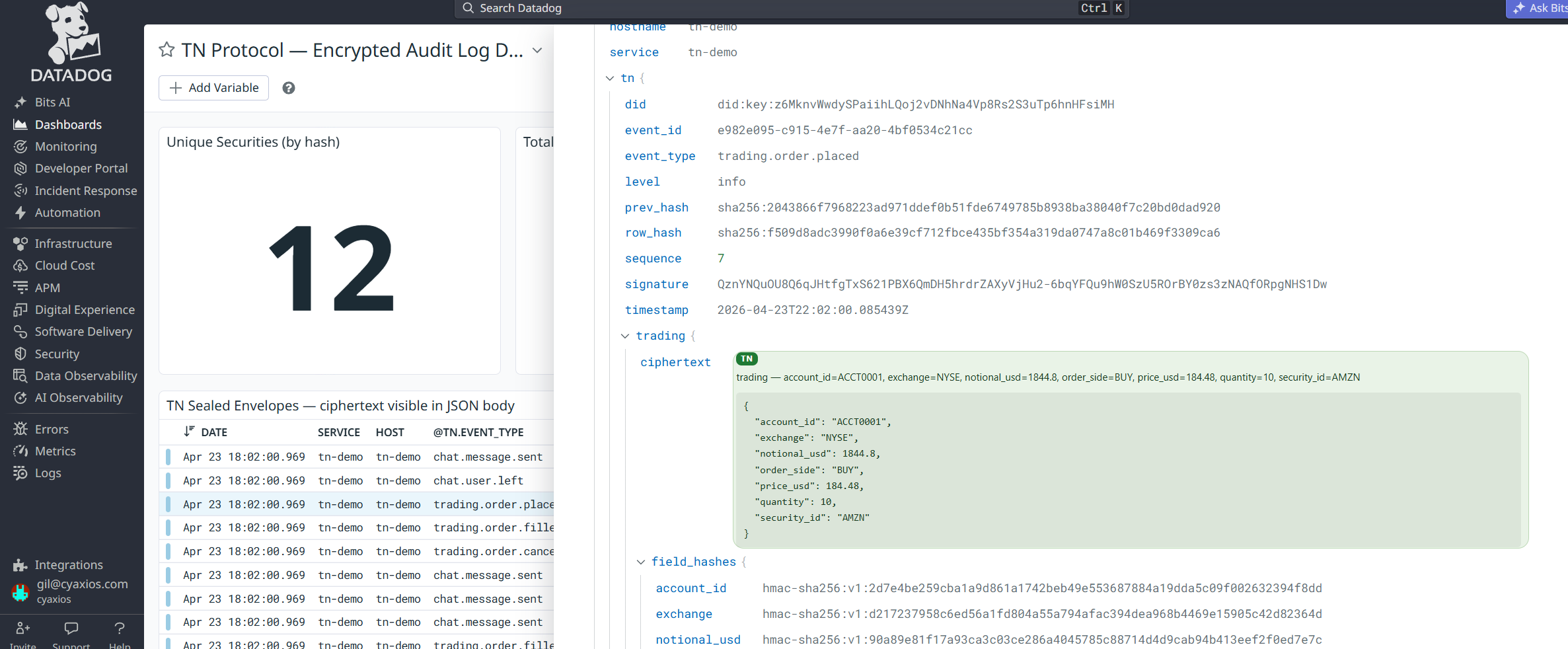
Datadog still works. Our Chrome extension makes it actually readable.
TN ships an OpenTelemetry adapter and handlers for most common log shippers. Your SIEM, your dashboards, your alerts — they all keep working. Sealed fields just look like opaque ciphertext to them, and there's nothing left to redact downstream.
And critically: contractors and consultants on-site to build your dashboards can't see sensitive data while they work. They get the fields they're granted, nothing else.

We have prompts for every major coding agent.
Claude Code, Cursor, Copilot, Windsurf, Aider. We maintain a skill and a prompt library for each one. Point your agent at your payment module, your auth flow, your event pipeline. Ask it to do what we did here.
The agents page has everything: the prompts, the AGENT.md reference the LLM reads, and the install instructions for each tool.
See the agent prompts